
AI Receipt Tracker
aireceipttracker
Screenshots
App details
- Updated
- November 28, 2024
- Requires
- Chrome
- License
- Full
- Developer
- aireceipttracker
- Category
- Web Apps
SoftPas in:
This product is also available in the following languages:
About AI Receipt Tracker
Download AI Receipt Tracker – Smart Expense Management Tool
Overview
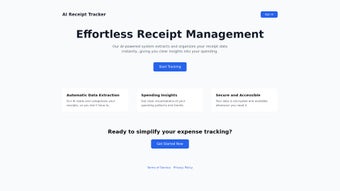
AI Receipt Tracker is a web‑based expense management solution that leverages cutting‑edge artificial intelligence to turn paper receipts into clean, searchable data. Traditional receipt logging often requires manual entry, a process that is time‑consuming and prone to human error. With AI Receipt Tracker, users simply upload a photo or PDF of a receipt, and the platform’s deep‑learning algorithms instantly extract key fields such as date, merchant, total amount, tax, and line‑item details. The extracted data is then automatically categorized—whether it’s travel, office supplies, meals, or utilities—allowing both individuals and businesses to keep a real‑time pulse on spending without lifting a pen. The tool also provides visual dashboards, trend analysis, and custom reports, giving users immediate financial insights that support smarter budgeting and decision‑making. Because it runs entirely in the browser and syncs to the cloud, there’s no need for bulky desktop software, and data is securely stored with end‑to‑end encryption. Whether you’re a freelancer tracking client‑related costs, a small business owner looking for a scalable solution, or an accountant needing to audit expense records, AI Receipt Tracker offers a modern, secure, and highly automated way to keep finances in check.
Key Features of AI Receipt Tracker
- AI‑Powered Data Extraction: Uses optical character recognition (OCR) combined with machine‑learning models to read and interpret receipts with >95% accuracy.
- Automatic Categorization: Expenses are sorted into predefined categories (travel, meals, office, etc.) or custom tags created by the user.
- Multi‑Format Support: Accepts photos, scanned PDFs, and digital receipt emails, making it easy to capture receipts from any source.
- Real‑Time Dashboard: Interactive charts and graphs display spending trends, monthly totals, and category breakdowns at a glance.
- Cloud Sync & Secure Storage: All data is encrypted in transit and at rest, with automatic backup to the cloud for access from any device.
- Bulk Upload & Batch Processing: Drag‑and‑drop multiple receipts to speed up onboarding of historical data.
- Export & Integration: Export reports in CSV, XLSX, or PDF formats and integrate with popular accounting tools via API.
- Multi‑User Collaboration: Teams can share a workspace, assign receipt ownership, and set permission levels for auditors.
- Smart Alerts & Reminders: Receive notifications for missing receipts, upcoming tax deadlines, or unusual spending spikes.
- Free Tier & Affordable Plans: A free version covers up to 50 receipts per month, while premium plans unlock unlimited storage and advanced analytics.
Installation & Usage Guide
Getting started with AI Receipt Tracker is intentionally straightforward, designed for users who may not be tech‑savvy. Because the application is web‑based, there is no traditional “installation” required on Windows, macOS, Android, or iOS. Follow these steps to begin tracking expenses instantly:
- Create an Account: Visit the official website and click “Sign Up.” You can register using an email address, Google, or Microsoft account. A verification email will be sent to confirm your identity.
- Set Up Your Workspace: After logging in, you’ll be prompted to create a workspace. Name it (e.g., “Freelance Projects” or “Company XYZ”) and select your preferred currency and fiscal year start month.
- Configure Categories: The platform ships with default categories, but you can add custom tags or rename existing ones to match your bookkeeping system.
- Upload Receipts: Click the “Upload Receipt” button. You can either drag‑and‑drop files, use your device’s camera to capture a live image, or forward email receipts directly to a unique mailbox address provided by the app.
- Review AI Extraction: Once uploaded, AI Receipt Tracker will process the receipt within seconds. A preview pane shows the extracted fields; you can edit any item that the AI misinterpreted before saving.
- Track & Analyze: Navigate to the “Dashboard” tab to see visual summaries of your spending. Use filters to view expenses by date range, category, or project.
- Export or Sync: When it’s time for tax filing or accounting, click “Export” to download a CSV file or enable the API integration to push data to QuickBooks, Xero, or your ERP system.
- Maintain Security: Enable two‑factor authentication (2FA) from the account settings page. Regularly review the “Activity Log” to monitor who accessed or modified receipt data.
Because the application runs in the browser, it automatically receives updates and security patches without any user intervention. All you need is a modern web browser (Chrome, Edge, Firefox, Safari) and an internet connection. For users who prefer offline access, a lightweight desktop wrapper (available for Windows and macOS) caches the most recent data and syncs changes when you reconnect.
Compatibility, Pros & Cons
Supported Operating Systems
AI Receipt Tracker is platform‑agnostic. Since it is a cloud‑first web application, it works seamlessly on any operating system with a modern browser, including Windows 10/11, macOS Ventura and later, Linux distributions, Android 8.0+, and iOS 13+. For power users, a downloadable Electron‑based desktop client is available for Windows and macOS, providing native notifications and offline caching.
Pros
- Fully automated receipt scanning eliminates manual data entry.
- High accuracy OCR and AI categorization reduce errors.
- Secure cloud storage with end‑to‑end encryption protects sensitive financial data.
- Scalable from individual freelancers to medium‑size enterprises.
- Real‑time dashboards give instant insight into spending patterns.
- Free tier makes it accessible for occasional users.
- Easy integration with popular accounting software via API.
- Multi‑device access ensures you can capture receipts on the go.
Cons
- Requires an internet connection for full functionality; offline mode is limited.
- Advanced analytics and bulk export are locked behind paid plans.
- OCR accuracy can drop on low‑resolution or heavily crumpled receipts.
- Custom branding and white‑label options are not available in the basic subscription.
- Initial setup of categories and workspace may be time‑consuming for large organizations.
Frequently Asked Questions
Is AI Receipt Tracker truly free to use?
Yes, there is a free tier that allows up to 50 receipt uploads per month, basic categorization, and access to the dashboard. For unlimited uploads, advanced reporting, and API access, premium plans start at $9.99 per month.
How secure is my financial data?
AI Receipt Tracker uses TLS 1.3 for data in transit and AES‑256 encryption at rest. Two‑factor authentication is optional, and all activity is logged for audit purposes. The service complies with GDPR and CCPA standards.
Can I integrate the app with my existing accounting software?
Absolutely. AI Receipt Tracker offers a RESTful API and pre‑built connectors for QuickBooks Online, Xero, and Sage. Exported CSV files can also be manually imported into most accounting platforms.
What types of receipts are supported?
The system accepts JPEG, PNG, PDF, and TIFF formats. It can also process email receipts that are forwarded to the unique mailbox address provided during setup.
Do I need to install any software on my computer?
No traditional installation is required. The web app runs in any modern browser. For users who prefer a desktop experience, a lightweight Windows/macOS client is available, but it is optional.
Conclusion & Call to Action
In a world where every receipt represents a data point that can either be lost or leveraged, AI Receipt Tracker provides a compelling bridge between paper and insight. Its AI‑driven extraction, automatic categorization, and secure cloud architecture remove the friction traditionally associated with expense management. While the free tier is generous enough for casual users, businesses that demand unlimited uploads, deep analytics, and integration capabilities will find the premium plans to be a worthwhile investment. The platform’s cross‑device compatibility ensures that you can capture expenses wherever they occur, and its robust security measures keep sensitive financial information safe. If you’re ready to stop typing numbers into spreadsheets and start letting intelligent software do the heavy lifting, the next step is simple: click the download button, create your free account, and experience a modern approach to expense tracking today.
Download AI Receipt Tracker now and transform the way you manage expenses.
Pros: Automated OCR, real‑time dashboards, secure cloud storage.
Cons: Limited offline mode, premium pricing for bulk features.
Guides & Tutorials
How to install AI Receipt Tracker
- Click the Download button above.
- Once redirected, accept the terms and click Install.
- Wait for the AI Receipt Tracker download to finish on your device.
How to use AI Receipt Tracker
This software is primarily used for its core features described above. Open the app after installation to explore its capabilities.
User Reviews
No reviews yet. Be the first to share your experience.
You may also like
more
3D AI Studio
3D AI Studio Overview 3D AI Studio is a web-based AI-powered tool developed by S...

3D textures by Polycam
Generate Realistic 3D Textures Effortlessly 3D Textures by Polycam is an innovat...

3DAiLY
Customizable 3D Modeling Tool: 3DAiLY 3DAiLY is an online platform that harnesse...

3DFY
Revolutionizing 3D Model Creation: 3DFY Review 3DFY is an AI-powered service, de...

AI Dungeon
AI Dungeon: Deep Learning Text Adventure AI Dungeon is an artificial intelligenc...

Alpha3D
A subscription-based program for Web apps, by alpha3d. Alpha3D is a subscription...